Snap Circuits Pro Review: Is the 500-in-1 Kit Worth It?
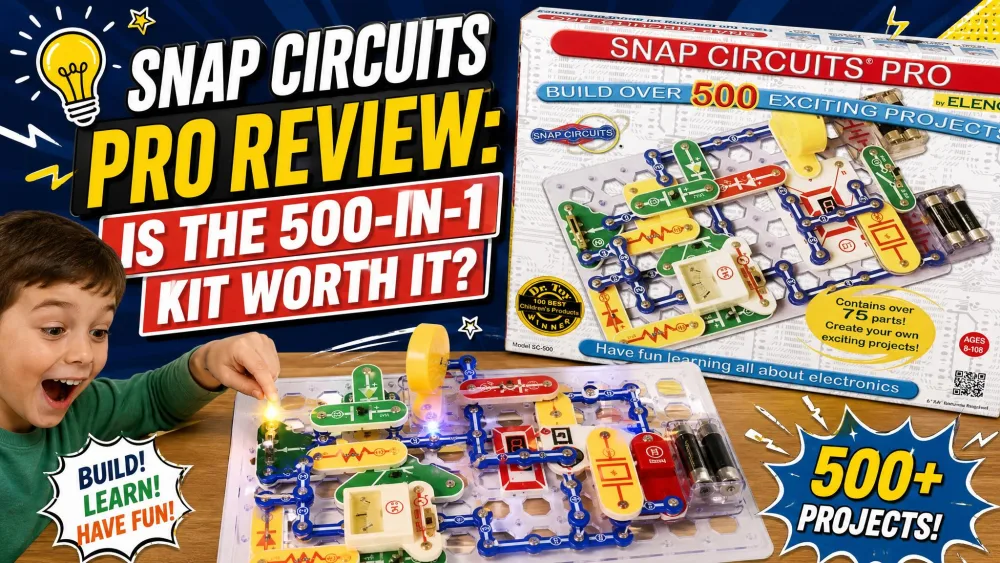
We did not buy the Snap Circuits Pro SC-500 to test it cold. Two of our older kids had already worked through the Jr. and Classic sets, so the Pro went to a ten-year-old who knew his way around a snap-together base grid. He spent the better part of an afternoon running back and forth from the kitchen table, holding up each finished circuit so the rest of the house had to admire it. That is the part the spec sheets miss, and it is where the honest cracks show.
This is a hands-on review, not a re-listing of the box copy. We built through the projects, hit the manual's thin spots, and landed on a verdict more measured than the glowing affiliate scores elsewhere. The kit is genuinely well made and genuinely fun. Whether it teaches electronics is a harder question.
Our Hands-On Verdict at a Glance
The short version: this is the best-built electronics kit we have put in front of our kids, and the one most likely to be followed like a coloring book instead of a lesson. A child can finish a working radio without understanding why it works. With a parent nearby, that gap closes fast. Alone, it stays open.
NoteWe tested the Pro with a ten-year-old who had already finished the Jr. and Classic sets. The build quality and the kid engagement matched the hype; the educational depth needed us in the room.
What Is Snap Circuits Pro (SC-500)?
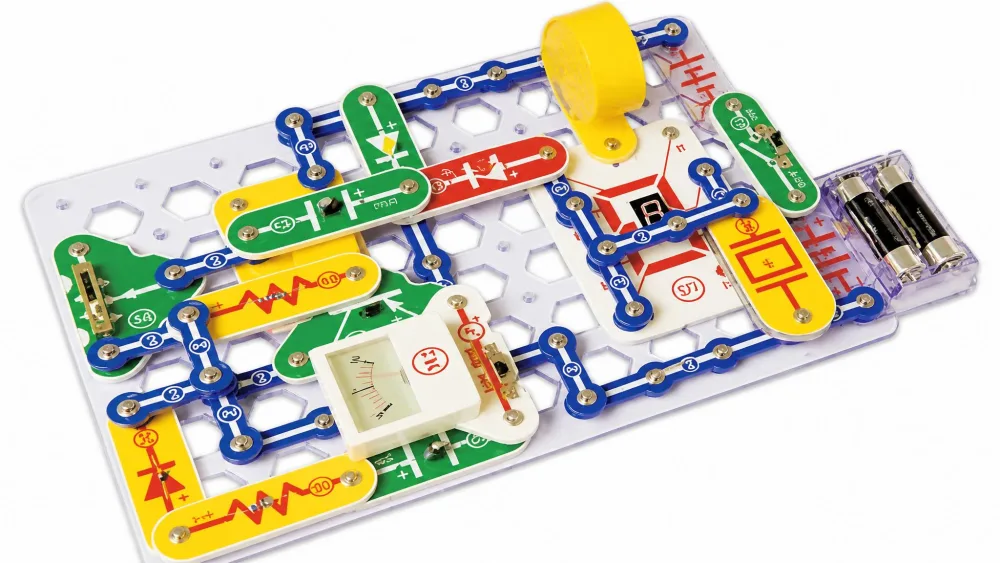
Snap Circuits is Elenco's line of solder-free electronics kits, and the Pro SC-500 sits in the upper-middle of that range. Every part is a real circuit component mounted on a plastic base with snaps on each corner, and the pieces click onto a grid the way building blocks do. There is no soldering and no tools required. A child reads the manual, matches the numbered, color-coded parts to the picture, and ends up with a working circuit.
The Pro is the tier where the projects stop being toys and start resembling real electronics. You can read Elenco's official Snap Circuits Pro spec sheet for the full parts list, but the headline is simple: more parts, more advanced components, and many more projects than the entry sets.
Who It's For (Ages, Skill Level)
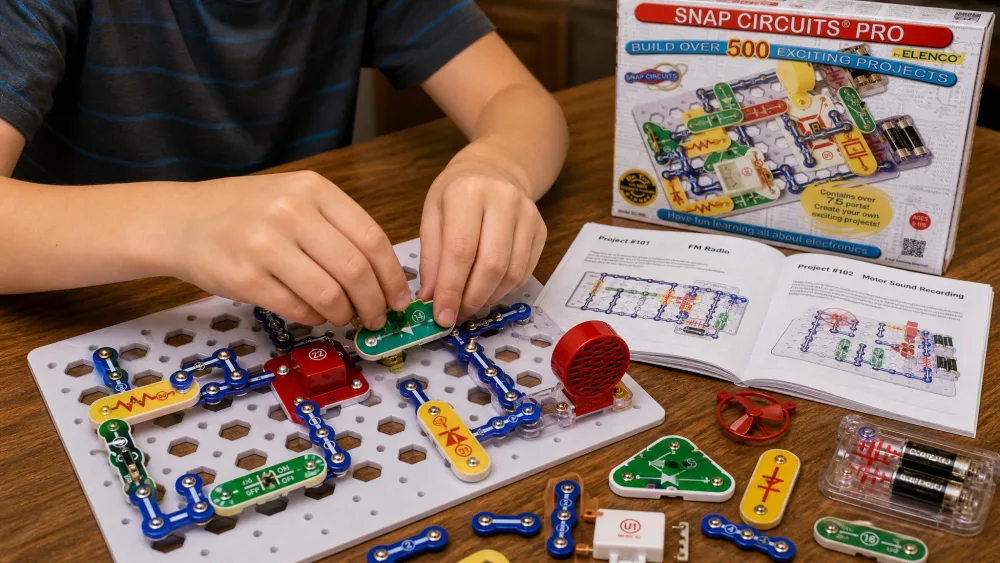
Elenco rates the Pro for ages 8 and up, and that floor is honest rather than optimistic. An eight-year-old can snap the parts and follow the pictures without trouble. The harder question is sequence, not age. In our experience the Pro lands best after a child has already worked through the Jr. SC-100 or the Classic SC-300. Jumping straight into the Pro's advanced sections as a first kit is a lot, and a younger child can stall on the busier builds.
The manuals are also reading-heavy. A confident reader moves through them alone, but a younger or struggling reader needs a parent alongside for the explanatory text. That is not a knock on the kit. It is a reason to think about where your child is starting from before you buy the biggest box.
What's in the Box: 70+ Parts and 500+ Projects
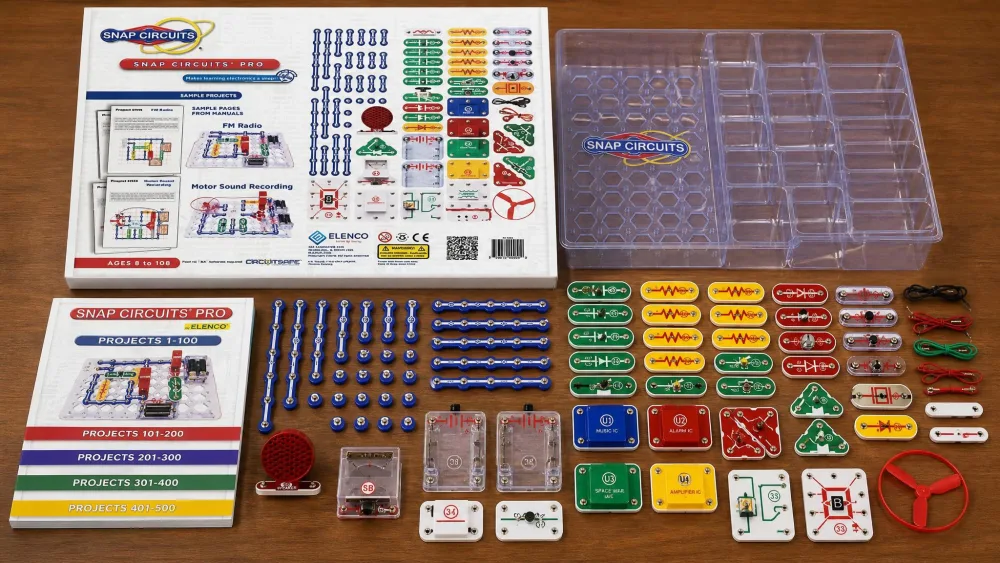
The Pro ships with 70-plus snap-together parts and over 500 projects, plus a set of full-color project manuals organized by difficulty. The parts are color-coded and numbered, which makes finding the right piece easy even for a kid working alone.
A few practical notes from unpacking it. The base grid is large, roughly 17.8 by 11.9 inches, and the kit is hefty at close to 3.85 pounds, so it wants a dedicated patch of table rather than a lap. A storage tray is included, but the loose small parts beg for a parts organizer if you want setup to stay quick. The Pro also requires 4 'AA' batteries, which are not included, so add a pack to the order if you want building to start the same day.
NoteHeads up on the name: the SC-500 reviewed here is the standard Snap Circuits Pro. A close sibling, the Pro Plus SC-510, offers around 510 projects with a revised manual. The two are easy to confuse on retail pages, so check the model number before you buy.
Key Features and Components
What separates the Pro from the cheaper tiers is the components, not just the project count. This is the first Snap Circuits set where a child builds with parts that show up in real consumer electronics rather than simplified stand-ins.
Advanced Parts: Microphone, 7-Segment Display, Recording IC
The Pro's parts list reads like a starter electronics bench. It includes a digital voice-recording IC, a microphone, an FM radio module, a 7-segment LED display, an analog meter, a transformer, a relay, and an AC generator. These are the pieces that make the advanced projects possible, and they are why a child who has finished the Classic still finds new ground here. The Pro contains all of the Classic SC-300 projects plus roughly 200 additional ones, so it is genuinely a superset rather than a sidestep.
Safety is built into the hardware. Snap Circuits use Elenco's patented Circuit Safe fuse technology, designed to protect the components if a circuit is wired wrong. With kids working semi-independently, that margin matters.
The Project Manual and Build Experience
The manual is where the Pro is both at its best and at its weakest. On the practical side, it is easy to follow: clear color pictures, numbered steps, and a difficulty progression that lets a child build confidence before tackling the harder circuits. The kit ships with multiple manuals organized by difficulty, so there is a natural on-ramp.
The weakness is conceptual. The manual is excellent at showing what to build and thin on explaining why the circuit works. A child can follow the diagrams perfectly and assemble a working radio without absorbing a single principle behind it. We come back to this in the verdict, because it is the most important thing to understand before you buy.
Hands-On: Building With Snap Circuits Pro
Once the parts were sorted, the building itself was the easy part. The first hour at the table was mostly the sound of snaps clicking and the occasional triumphant shout when something lit up or made noise. The kit earns its reputation here.
Ease of Assembly (No Soldering, No Tools)
The snap quality is the best thing about this kit, full stop. The components are well made and sturdy, and the modules click together cleanly with no tools and no fuss. Each connection has a satisfying, positive snap, and parts do not work loose mid-build the way cheaper grid toys do. The color-coded, numbered parts make the right piece easy to find, so the friction sits in the storage and sorting rather than the building.
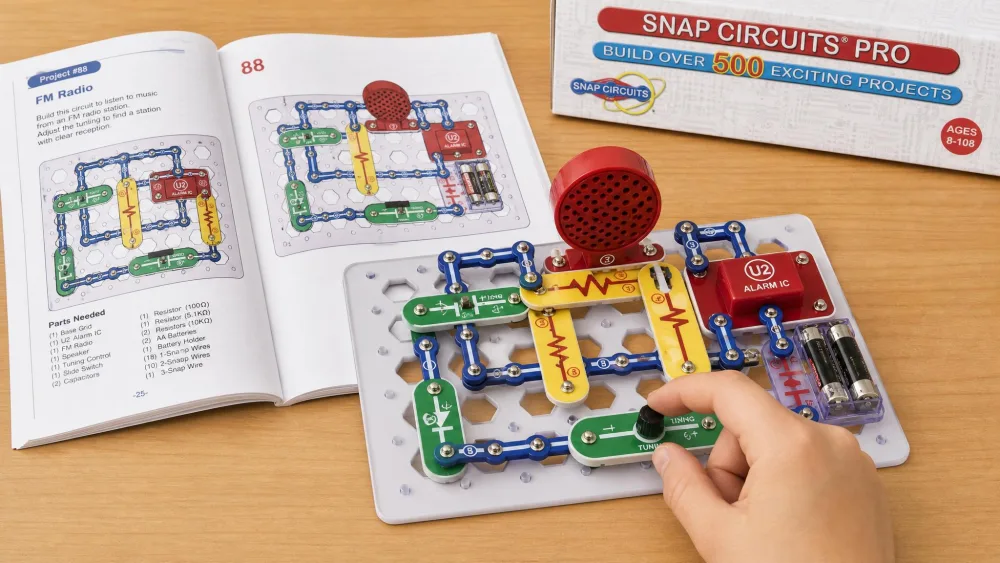
Standout Projects: FM Radio, Voice Recorder, Burglar Alarm
A few builds did the heavy lifting on engagement. The voice recorder was the clear highlight in our house: the kids loved hearing their own voices played back through a circuit they had built themselves, and they ran it over and over. The FM radio was the other winner. That build took roughly 45 minutes and actually pulled in local stations, the kind of real-world payoff that makes the effort feel earned. The burglar alarm, doorbell, and adjustable light control rounded out the projects the kids kept coming back to.
This is where the engagement claim earns its keep. The pull is strong and immediate. Kids get excited, they want to show off the finished builds, and the afternoon disappears into a string of small victories. The Pro is not a kit that gets opened once and shelved.
Educational Value
Here is the honest part. The Pro is a wonderful building experience and a more complicated teaching tool, and the gap between those two things is the whole story of this kit.
What Kids Actually Learn About Electronics
The most credible critique of Snap Circuits is not that it is flimsy or boring. It is that the experience is manual-bound. Kids follow the picture diagrams, place the pieces, and finish a working project without necessarily understanding why the circuit does what it does. One write-up summed it up bluntly as a great concept with terrible execution, and after building through the projects we understand the frustration. Ask a child what they learned about electricity after an afternoon of building, and the honest answer can be "not really."
Great concept, terrible execution: a child can finish a working circuit without ever learning why it works.
That does not make the kit worthless. It makes it dependent. The components and the projects are an outstanding scaffold for learning. They simply do not deliver the learning on their own. The "why" needs an adult to fill in, which means the Pro pays off most when a parent or teacher treats each build as a starting point rather than a finish line.
Homeschool and Classroom Use
For homeschool and classroom use, that dependency is a feature rather than a flaw, because an adult is already in the loop. We lean on the kit the way the critique implies you should: let the child build the circuit, then stop and ask what each part is doing and what would happen if you changed it. Hands-on circuit work is well-supported as a way to teach electronics. There is solid research on hands-on STEM learning covering series and parallel circuits, open and closed circuits, voltage, current, and resistance, and the Pro gives you a physical way to make those lessons concrete. The kit supplies the build; you supply the lesson.
Pros and Cons
After weeks of the Pro living on our table, the trade-offs sorted themselves out cleanly.
Pros
- Outstanding snap quality; sturdy, well-made parts that click cleanly with no tools
- Genuinely advanced components (recording IC, FM module, 7-segment display, AC generator)
- Over 500 projects, including all the Classic SC-300 builds plus roughly 200 more
- Strong, immediate kid engagement; the voice recorder and FM radio are real highlights
- Solder-free and battery-safe, with patented Circuit Safe fuse protection
- Durable over years of use, with replacement parts available from Elenco
Cons
- Manual shows what to build but is thin on why the circuit works
- Deep learning depends on an adult being present to fill the gap
- Reading-heavy manuals are a hurdle for younger or struggling readers
- Loose small parts and a large, heavy base beg for a parts organizer
- Pricier than generic circuit toys
- Best after the Jr. or Classic sets, not ideal as a very first kit
What We Liked
The build quality and the engagement are not close calls. This is the kit our kids asked to get back out, and the parts have held up to repeated builds without complaint. The advanced components give it real headroom, so a curious child does not exhaust it quickly.
Where It Falls Short
The manual is the weak link, and it is a real one. If you hand this to a child and walk away, you have bought an expensive set of follow-the-picture puzzles. That is fine if you wanted an engaging activity. It disappoints if you expected the kit to teach electronics by itself.
Snap Circuits Pro vs Other Snap Circuits Kits
The Pro does not exist in isolation. It sits in a clear ladder, and the right rung depends on your child's age, experience, and budget.
| Kit | Projects | Parts | Recommended age | Educational depth | Value / price |
|---|---|---|---|---|---|
| Snap Circuits Pro SC-500 | 500+ | 70-plus | 8+ | Advanced (recording IC, FM, 7-segment, AC generator) | Mid-to-upper; check current price |
| Snap Circuits Classic SC-300 | 300+ | 60+ | 8+ | Intermediate (microphone, AM radio, organ) | Lower tier |
| Snap Circuits Jr. SC-100 | 100+ | ~30 | 8+ | Entry (basic switches, doorbell, siren) | Lowest tier |
| Snap Circuits Extreme SC-750 | 750+ | 80+ | 8+ | Most advanced (adds computer interface and software) | Highest tier |
vs Snap Circuits Classic SC-300
The Classic is the natural step below the Pro, and the two overlap heavily by design. The Pro contains every Classic project plus roughly 200 more, so think of the Classic as the first 300 projects and the Pro as those plus the advanced tier. The Classic adds a microphone and builds like an AM radio and an organ; the Pro layers on the recording IC, FM module, and 7-segment display. If your child is new to electronics, the Snap Circuits Classic SC-300 review is worth reading first, because starting there and upgrading later is often the smarter path.
vs Snap Circuits Jr. SC-100
The Jr. is the true entry point, with around 30 parts and over 100 projects for the youngest builders. Its builds are simpler: sound-activated switches, a musical doorbell, a police siren. It is the right first kit for a six- or seven-year-old, and our Snap Circuits Jr. SC-100 review covers it in full. The Jr. upgrades cleanly toward the Pro with a UC-40 upgrade kit, so a family can start small and grow the set rather than rebuying.
vs Snap Circuits Extreme SC-750
The Extreme sits one rung above the Pro, with over 750 projects, 80-plus parts, and a computer interface with software on the variants that include it. It is the most advanced consumer tier and the most expensive. For most families the Pro is the sweet spot, because the Extreme's extra projects lean heavily on the computer-interface features that not every household will use. If your child is already deep into electronics and wants PC-connected experiments, the Extreme makes sense; otherwise the Pro covers the same fundamentals for less.
Is Snap Circuits Pro Worth It? Our Verdict
So, is the Snap Circuits Pro worth it? For the right child and the right buyer, yes, with one condition. The build quality is excellent, the engagement is real, and the advanced components give it years of life. Families routinely own multiple Snap Circuits sets and combine them for bigger builds, and because Elenco sells replacement parts, a lost or broken piece does not retire the kit. The intricate snaps are hard to mass-produce cheaply, which is part of why these kits cost more than generic circuit toys, and on durability that premium is earned.
The condition is the manual. The Pro will not teach your child electronics on its own, because the projects are diagram-following and light on the underlying "why." Buy it expecting a superb, durable building experience and a launchpad for learning that you help steer, and it is one of the best STEM kits available for kids 8 and up. Buy it expecting a self-teaching electronics tutor, and you will be disappointed. Sequence it after the Jr. or Classic, plan to sit alongside for the advanced builds, and the Pro rewards the effort.
Frequently Asked Questions
What age is Snap Circuits Pro for?
Elenco rates it for ages 8 and up, and that floor holds in practice. The bigger factor is experience: the Pro works best after a child has already done the Jr. or Classic set, since the advanced sections can overwhelm a younger first-timer.
Is Snap Circuits Pro better than the Classic SC-300?
It is bigger, not different in kind. The Pro includes every Classic project plus roughly 200 more, and it adds parts the Classic lacks, like the voice-recording IC, FM module, and 7-segment display. For a beginner, starting with the Classic and upgrading later is often the cheaper route.
What's the difference between Snap Circuits Pro (SC-500) and Pro Plus (SC-510)?
They are close siblings. The Pro Plus SC-510 offers around 510 projects with a revised manual and a near-identical parts set, so it is roughly ten projects more than the SC-500. Retailers describe the relationship inconsistently, so check the model number and project count on the listing before you buy.
How many projects and parts does Snap Circuits Pro include?
It includes over 500 projects and 70-plus snap-together parts. Published part counts vary a little by listing and packaging revision, so treat 70-plus as the reliable figure rather than a single exact number.
Can you expand Snap Circuits Pro with other kits?
Yes. Snap Circuits parts are cross-compatible, and the lower tiers upgrade upward with dedicated upgrade kits: a Jr. SC-100 moves to the Classic with a UC-30 and to the Pro with a UC-40, then to the Extreme with a UC-60. Elenco also sells replacement parts.
Does it require batteries, soldering, or tools?
No soldering and no tools are required; the parts simply snap together. It does need 4 'AA' batteries, which are not included, so plan to add a pack so your child can start building right away.